Moriarty and Friends CMP: Difference between revisions
(updated ports and versions) |
|||
| (13 intermediate revisions by the same user not shown) | |||
| Line 19: | Line 19: | ||
| Minecraft Server Address for Bedrock Clients|| lafleurcraft.com:19132 | | Minecraft Server Address for Bedrock Clients|| lafleurcraft.com:19132 | ||
|- | |- | ||
|Map || Bluemap: [http://lafleurcraft.com: | |Map || Bluemap: [http://lafleurcraft.com:84 http://lafleurcraft.com:84] | ||
|- | |- | ||
|Seed|| (map) [https://www.chunkbase.com/apps/seed-map#4259803136545493218 4259803136545493218] | |Seed|| (map) [https://www.chunkbase.com/apps/seed-map#4259803136545493218 4259803136545493218] | ||
| Line 44: | Line 44: | ||
=== Bluemap === | === Bluemap === | ||
Provides the map: [http://lafleurcraft.com: | Provides the map: [http://lafleurcraft.com:84 Lafleurcraft.com:84] | ||
[https://bluemap.bluecolored.de/ Bluemap homepage] | [https://bluemap.bluecolored.de/ Bluemap homepage] | ||
=== Simple Voice Chat Discord Bridge === | === Simple Voice Chat Discord Bridge === | ||
| Line 96: | Line 89: | ||
! DNS Server!! Address | ! DNS Server!! Address | ||
|- | |- | ||
| Primary|| 139.59.200.206 | |<s> Primary</s>||<s>1.1.1.1</s> | ||
|- | |||
|<s> Primary</s>||<s>139.59.200.206</s> | |||
|- | |||
|<s> Primary</s> ||<s>104.238.130.180</s> | |||
|- | |||
|<s> Primary</s> ||<s>45.55.68.52</s> | |||
|- | |||
|<s> Primary</s> ||<s>173.82.100.84</s> | |||
|- | |||
|<s> Primary</s> ||<s>213.171.211.142 UK</s> | |||
|- | |||
|<s> Primary</s> ||<s>217.160.58.93</s> "German" UNTESTED | |||
|- | |||
|<s> Primary</s> ||<s>134.255.231.119</s> "German" UNTESTED | |||
|- | |||
|<s> Primary</s> ||<s>188.165.49.178</s> UNTESTED | |||
|- | |||
|<s> Primary</s> ||<s>91.218.66.13</s> UNTESTED | |||
|- | |||
|<s> Primary</s> ||<s>207.244.229.200</s> UNTESTED | |||
|- | |||
| Primary|| x.x.x.x | |||
|- | |- | ||
| Secondary|| 8.8.8.8 | | Secondary|| 8.8.8.8 | ||
| Line 102: | Line 117: | ||
[https://shockbyte.com/billing/knowledgebase/850/How-to-Connect-to-your-Minecraft-Bedrock-Server-on-Nintendo-Switch.html (Source)] | [https://shockbyte.com/billing/knowledgebase/850/How-to-Connect-to-your-Minecraft-Bedrock-Server-on-Nintendo-Switch.html (Source)] | ||
The DNS keeps changing. You might need to google the current DNS. Sorry. | |||
== Step 2 - Login with both accounts == | == Step 2 - Login with both accounts == | ||
Latest revision as of 04:17, 26 October 2025
Origin Story
Server Founded 8-29-2023
We were at Judah's 8th Birthday party, and I noticed 1/3rd of the kids had Minecraft shirts on, so I asked if they'd be interested in setting up a server to play on. Interest was expressed, and here we are.
Moriarty and I picked out a seed that had a HUGE mushroom island near spawn. No hostile mobs spawn on mushroom islands, which makes these an advantageous place to build a mostly safe base.
Server Details
| Thing | Content |
|---|---|
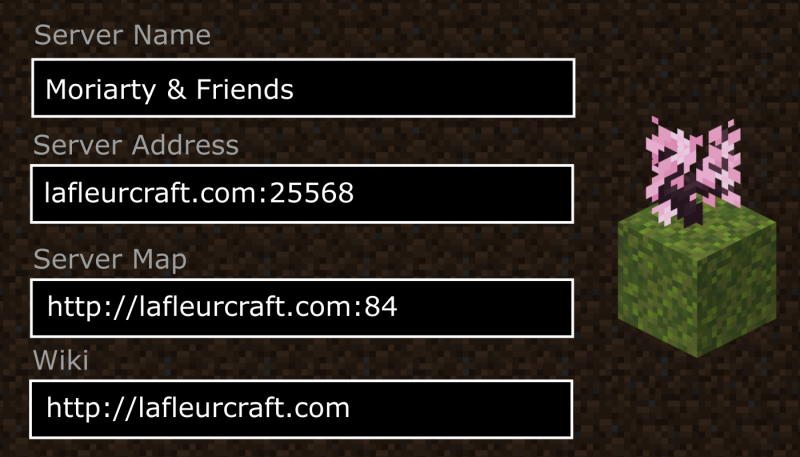
| Minecraft Server Address for Java Clients | lafleurcraft.com:25568 |
| Minecraft Server Address for Bedrock Clients | lafleurcraft.com:19132 |
| Map | Bluemap: http://lafleurcraft.com:84 |
| Seed | (map) 4259803136545493218 |
| Voice Chat | Port 24457 |
| Current Version | 1.21.7 |
Mod Information
Client Side Mods
Simple Voice Chat
Download from Modrinth or Download from CurseForge
Server Side Mods
Bluemap
Provides the map: Lafleurcraft.com:84
Simple Voice Chat Discord Bridge
Allows Switch users, or anyone else who doesn't have the Simple Voice Chat mod, to join the voicechat via the Discord: (Invite link to join Lafleurcraft Discord)
To start a voice bridge in-game, in the chat, type:
/dvc start
(A bot will connect to the discord channel to function as the bridge.)
On the Discord, you can join the voice channel for the server: Moriarty and Friends Voice Chat (Discord Link)
Simple Voice Chat Discord Bridge Modrinth page
Geyser & Floodgate
Allows bedrock clients to connect to the Java server.
Litemoretica
Allows server-side functionality for Litematica, which is a client-side blueprint utility mod.
WorldEdit
A creative utility mod.
How to Connect from Nintendo Switch
Step 1 - DNS
On the Nintendo Switch's Internet Settings, update the DNS settings from Automatic to Manual, then enter:
| DNS Server | Address |
|---|---|
| Primary | x.x.x.x |
| Secondary | 8.8.8.8 |
The DNS keeps changing. You might need to google the current DNS. Sorry.
Step 2 - Login with both accounts
You need to log in with both your Nintendo, and Microsoft Accounts
Step 3 - Connect to the server
Once the DNS is updated, in the Minecraft app, trying to connect to one of the built in 6 servers instead opens the secret menu.
| Setting | Value |
|---|---|
| Server Address | lafleurcraft.com |
| Server Port | 19132 (default) |
| (Optional) Display Name on Server List | Moriarty and Friends |
| (Toggle) Add to server list | (Optional) adds this server to the secret menu |